
Create beautiful Guitar Tablature using a dedicated font instead of images, or ASCII tab.
GuitarTabFont sample (swipe
left)
к»»»»»»»»»»»»»»»»»»»»»»¨»»»»»»»»»»»»»»
и»»»»»»»»ӚӚ»ª»Ϙβμ»»»»»čш✡ї»ґˡ˺ˡ˺ƴ»»»»
и»»»»»»»»ӚӚ»ª»Ϙβμ»»»»»»»»»»»»»»»»»»»»»
и»»»»¨»¨»ӚӚ»ª»Ϙβ컣»»»»»»»»»»»»»»»»»»»
и»»»»¦»¦»ӚӚ»¨»ϖβ껣»»»»»»»»»»»»»»»»»»»
йϧϧϧϧ»ϧ»»»»»»»»»»»¡»»»»»»»»»»»»»»»»»»»
и»»»»»»»»ӚӚ»ª»Ϙβμ»»»»»čш✡ї»ґˡ˺ˡ˺ƴ»»»»
и»»»»»»»»ӚӚ»ª»Ϙβμ»»»»»»»»»»»»»»»»»»»»»
и»»»»¨»¨»ӚӚ»ª»Ϙβ컣»»»»»»»»»»»»»»»»»»»
и»»»»¦»¦»ӚӚ»¨»ϖβ껣»»»»»»»»»»»»»»»»»»»
йϧϧϧϧ»ϧ»»»»»»»»»»»¡»»»»»»»»»»»»»»»»»»»
Note: content is constantly being improved
Why use TabFonts.com?
Historically, creating tablature meant that a guitarist or a
composer would need to create images in one form or another.
Either
someone would generate an image file or svg (scalable vector
graphices image) using
proprietary software, or be forced to
create ugly ASCII tablature.
Images have to be custom-made, on demand, and differ drastically
from one
source to another. Each choice leads to a negative
experience.
One common example is the space around the notes are written over.
It can make the
generation of images difficult, rather
unappealing, and quite frankly, illogical.
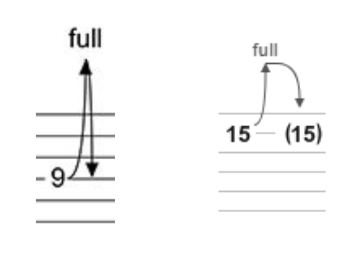
Take the following for example:
Example of tablature crossing strings
GuitarTabFont example
»»»»
»»ĕџ
»»»»
ďс»»
»»»»
»»»»
»»ĕџ
»»»»
ďс»»
»»»»
»»»»
For example, the image on the left shows a full bend at the 9th
fret, and crosses all strings
making it very difficult to display the information. By "decorating" the unicode characters,
GuitarTabFont contains the necessary diacritic info, neatly contained in single glyphs.
Every character is "self-contained"
making it very difficult to display the information. By "decorating" the unicode characters,
GuitarTabFont contains the necessary diacritic info, neatly contained in single glyphs.
Every character is "self-contained"
A New Standard for Guitar Tablature
The all-new Guitar Tab Fonts bring a new standard to the table, building on the antiquated ASCII tablature, decorating characters with diacritics,accent marks and symbols, so that a person can copy and paste it to any destination that uses the font, such as; Text-editors, web pages, etc.
You can embed the font in your own web page and the audience will see beautiful tablature! By using an easy to use guitar tablature builder page such as the one on here, one can assemble any composition they'd like and copy the text. Those who do not have the font installed or are not using the font explicitly would see mostly gibberish. If you find an improvement or have other suggestions please contact me. I would love to hear from you! Note that the source and the font are not open source but you are free to use them so long as you give credit, and there is a clear link back to my site. It's all in the license indicated below. In effect, you would not be able to modify the font.
GuitarTabFont to the rescue!
Slides
»»»»
»»»»
ϐββλ
»»»»
»»»»
ϐββλ
»»»»
Pick Slides
»»»»»»
»»»»»»
юююююю
»»»»»»
»»»»»»
юююююю
»»»»»»
Ghost Bends
»»»»Ӆс
ɂшՕ»»»
»»»»»»
»»»»»»
ɂшՕ»»»
»»»»»»
»»»»»»
Harmonic Natural
»»»»»
»»»»»
»»Ў»»
»»»»»
»»»»»
»»Ў»»
»»»»»
Pick Harmonic
»»»»
»»»»
»»»Ш
»»»»
»»»»
»»»Ш
»»»»
Tap Harmonic
»»»»
»»»»
»¡»Ἷ
»»»»
»»»»
»¡»Ἷ
»»»»
Bends
»»»»»»
»»»»»»
øģàƪŀƕ
»»»»»»
»»»»»»
øģàƪŀƕ
»»»»»»
Chains of Hammer/Pulloff/Tap
»»»»»»
»»»»»»
Ҙ˧ΒʹͲǖ
»»»»»»
»»»»»»
Ҙ˧ΒʹͲǖ
»»»»»»
Gradual Bends
»»»»
¥ἰἰἵ
»»»»
»»»»
¥ἰἰἵ
»»»»
»»»»
Vibrato
»»»»
»§зз
»»»»
»»»»
»§зз
»»»»
»»»»
And More!!!
к»»»»»»»н
и»»»»Ӛ¨❎л
и»»»»Ӛ¦»л
й»»ϧϧЁ»»м
и»»»»Ӛ¨❎л
и»»»»Ӛ¦»л
й»»ϧϧЁ»»м
Download True-Type Font
Important! By downloading the GuitarTabFont.ttf, True-Type Font, you agree to the CC-BY-NC license by Creative CommonsExperiment with TabFonts Control Panel
Use the control panel to build your own tablature. When you are satisfied with the result, or to start a new staff, click the "Export" button ( )
)below and it will be placed into a new textarea field at the bottom so that you can copy the text If you have the font installed, you should be able to see your composition by using the GuitarTabFont font


